Members Area


Recommended Sites:

Top Freeware Keywords
photo editor freeware download
photoshop freeware download
effects freeware download
image editor freeware download
background freeware download
photo freeware download
picture freeware download
paint freeware download
brushes freeware download
text freeware download
image freeware download
editor freeware download
graphics freeware download
graphic freeware download
free freeware download
images freeware download
digital freeware download
batch freeware download
file freeware download
graphic tool freeware download
color freeware download
texture freeware download
tool freeware download
styles freeware download
desktop freeware download
generator freeware download
wallpaper freeware download
seamless freeware download
resize freeware download
album ds design freeware download


Paint.NET 3.5.10 freeware     Save this freeware to your freeware selection - Saved Freeware

(41 ratings)

Author

Getpaint

OS Windows2000, Windows2003, WinXP, Windows Vista, Windows Vista x64, Windows 7, Windows 7 x64
Date Released October 09, 2011
Downloads 24416
Filesize 3.64 MB
Keywords image editor, customize image, photo editor, edit, editor, customize, Paint NET
Your Rating
  - click to rate
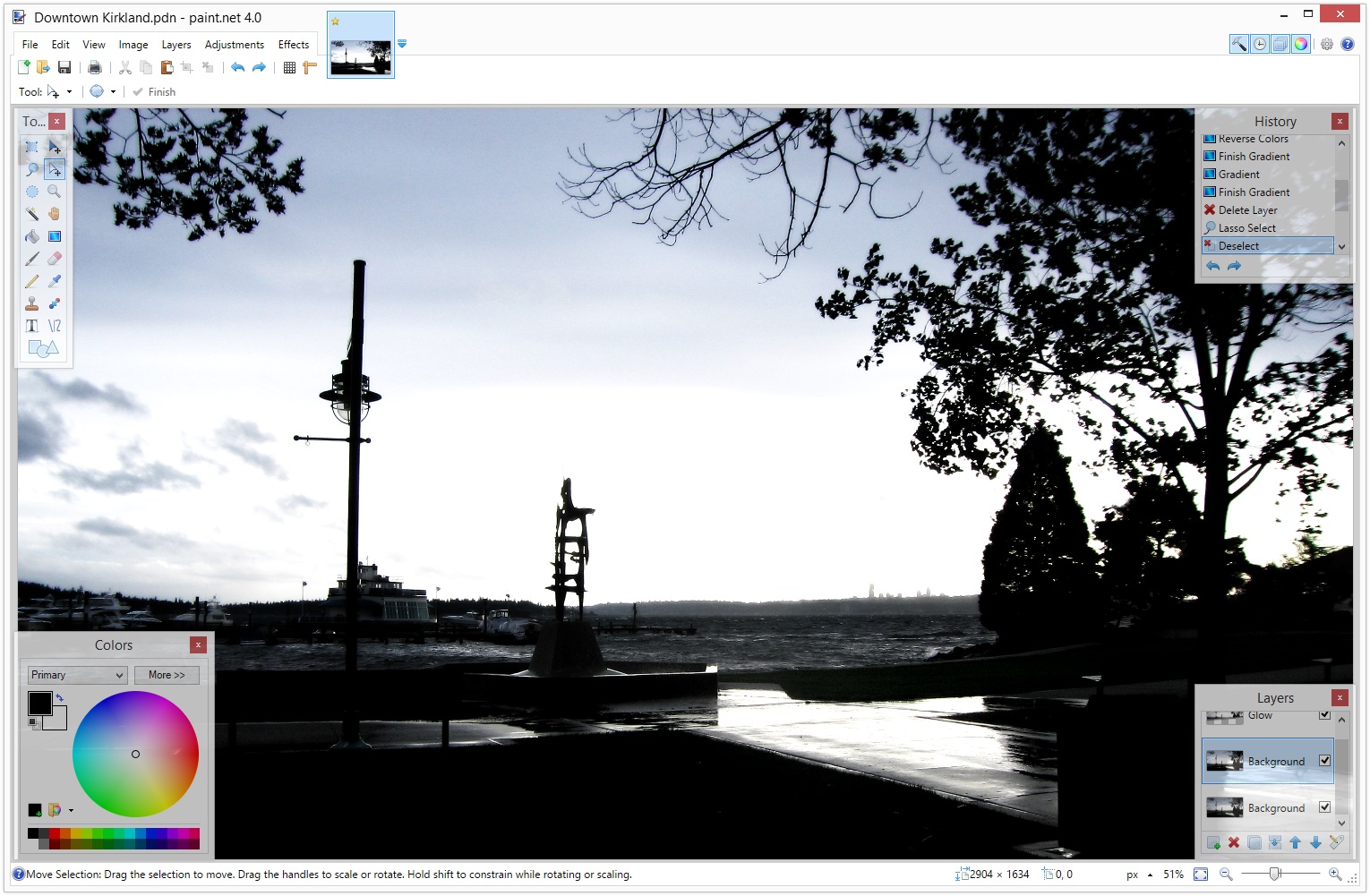
Paint.NET screenshot
[ View full size screenshot ]

Download Paint.NET   Save Freeware   Report Spyware

Paint.NET is free image and photo editing software for computers that run Windows. It features an intuitive and innovative user interface with support for layers, unlimited undo, special effects, and a wide variety of useful and powerful tools. An active and growing online community provides friendly help, tutorials, and plugins.

Download Paint.NET   Save Freeware   Report Spyware


Paint.NET freeware - download notice

Paint.NET Free Download - we do not host any Paint.NET torrent files or links of Paint.NET on rapidshare.com, depositfiles.com, megaupload.com etc. All Paint.NET download links are direct Paint.NET full download from publisher site or their selected mirrors.

Paint.NET freeware - Latest User Reviews

 Write a Review   


Paint.NET freeware - The Latest Versions History

Version Date Released Status Release Notes
3.5.10 Oct 9, 2011 New Release * Fixed: Ctrl+Shift+A now works again as a shortcut for View -> Actual Size (broken in 3.5.9)
* Fixed: Ctrl+0 still works for View -> Actual Size even if 10 or more images are open (broken in 3.5.9, it would switch to the 10th image).
3.5.9 Oct 1, 2011 New Release Fixes since the 3.5.9 Beta include a few compatibility issues with plugins
3.5.8 Mar 5, 2011 New Release · Fixed: Saving to a folder that has been moved or renamed will display an error instead of crashing (regression from 3.5.6)
· Fixed: Saving to a Sharepoint site will now work (regression from 3.5.6)
· Fixed: Saving to a file that is marked as read only will now give an error instead of crashing (regression from 3.5.6)
· Fixed: General reliability and correctness improvements to fault-tolerant saving
3.5.7 Feb 20, 2011 New Release · Saving an image is now fault-tolerant. If there is an error or crash while saving, the original file will be left alone.
· Worked around a bug in some plugins that are incorrectly using the built-in Gaussian Blur effect. For example, Sharpen+. Now they won't crash.
· Fixed a bug with Edit->Paste into New Image, where the new image would be 1 pixel too wide or tall
· Fixed a bug with the Rectangle Select tool and Fixed Ratio selection, which would be off by 1 pixel
· When pasting an image from Paint.NET into Paint.NET, it will be a little smarter about where it puts the image. Previously, if the location wasn't within the viewport, it would be placed at the top-left corner of the viewport. Now it will find the nearest point along the edge of the viewport to place the image.
· The EXIF rotation ("orientation") metadata is now discarded when opening an image, which was causing aggravation with images that could then never be reoriented correctly using Image->Rotate
3.5.6 Nov 18, 2010 New Release · Every so often an update is necessary to fix 1 bug. The bug in question was reported only recently over on the forum, although I’m pretty sure it’s been in the product since the v3.0 release in early 2007!

· It’s classified as a data loss bug, although thankfully it’s a relatively minor one. When Paint.NET starts up, it creates an initial/default image (blank and 800×600) if it wasn’t told to open a specific file. Then, when you eventually/probably open another image it will close that initial/default image as long as it wasn’t modified. The idea is that if you didn’t modify that initial image then you probably don’t care about it, and closing it doesn’t result in any data loss (it’s pretty easy to recreate a blank 800×600 image).

· Well, I messed up a little on the implementation of determining whether the image was one that could be automatically discarded.
3.5.5 Apr 26, 2010 New Release · Fixed the bug where saving as 8-bit PNG/GIF/BMP wasn't always working, usually with larger images.
· Improved the performance of the Gaussian Blur effect by 30-40%.
· Improved the performance of all the layer blending modes by 15-30%.
· Improved the performance of zooming with the mouse wheel on dual-core Intel Atom systems.
· Updated to support .NET 4.0 if no other version of .NET is installed.
· Reduced download size from 4.8MB down to 3.5MB.
· Fixed a small error in the Chinese translation.
3.5.4 Apr 12, 2010 New Release · This update fixes a few small bugs, and improves performance of the Flatten command.
· Improved performance of the Image->Flatten command by making it multithreaded.
· Fixed the File->Save As dialog not opening to the correct folder.
· Fixed a crash with certain plugins and their use of the File Open dialog.
· Fixed a very rare crash with the toolbar's font list.
3.5.3 Feb 8, 2010 New Release · Fixed DirectDraw Surface (.dds) file format support for CPUs which do not have SSE2 (Pentium III, Athlon XP).
· Fixed an issue with the File->Save dialog related to file type plugins that were only written for opening (importing).
· Fixed some crashes which were supposed to be "out of memory" errors.
· Fixed a race condition with the New Image, Canvas Size, and Resize dialogs. If you typed extremely fast you could cause a crash by typing a negative number and immediately pressing OK or Enter.
· Fixed a File->Save dialog issue in Win7/Vista where it could ask you about overwriting the wrong file.
3.5.2 Jan 4, 2010 New Release · New: For Windows 7, added taskbar progress reporting for long running operations (effects, adjustments, Image->Resize, save, install)
· Made some corrections to the French translation
· Running setup with /auto will no longer launch Paint.NET when it’s done
· Fixed an issue where Paste into New Image would refuse an image on the clipboard, even if regular Paste would take it
· Fixed a race condition with Edit->Paste and Image->Resize whereby it would take up 100% CPU and take between 1 minute to 1 hour to finish
· Fixed an issues with Copy/Paste where it would leave an extra line of transparent pixels on the left, top, right, and/or bottom edges
· Fixed lag with the paintbrush tool that was being seen on some systems
· Fixed some issues with the paintbrush and eraser tool being misaligned when zoomed in
· Fixed a crash that would happen at (seemingly) random times, such as after drawing with the paintbrush tool, on some systems
3.5.1 Nov 20, 2009 New Release · New: For Windows 7, added taskbar progress reporting for long running operations (effects, adjustments, Image->Resize, save, install)
· Made some corrections to the French translation
· Running setup with /auto will no longer launch Paint.NET when it’s done
· Fixed an issue where Paste into New Image would refuse an image on the clipboard, even if regular Paste would take it
· Fixed a race condition with Edit->Paste and Image->Resize whereby it would take up 100% CPU and take between 1 minute to 1 hour to finish
· Fixed an issues with Copy/Paste where it would leave an extra line of transparent pixels on the left, top, right, and/or bottom edges
· Fixed lag with the paintbrush tool that was being seen on some systems
· Fixed some issues with the paintbrush and eraser tool being misaligned when zoomed in
· Fixed a crash that would happen at (seemingly) random times, such as after drawing with the paintbrush tool, on some systems


Featured downloads
Paint.NET
Paint.NET
Paint.NET is free image and photoediting software for computers that run Windows
PhotoScape
PhotoScape
Photoscape is the fun and easy photo editing software

Most popular Editors freeware downloads


Photo! Editor 1.1 freeware download


Powerful and easy-to-use image editing tools for free
Details   Download   Save Freeware

PhotoScape 3.6 freeware download


Photoscape is the fun and easy photo editing software
Details   Download   Save Freeware

Life Photo Maker 1.40 freeware download


Add water, snow, and rain effects to your digital photos
Details   Download   Save Freeware

Paint.NET 3.5.10 freeware download


Paint.NET is free image and photoediting software for computers that run Windows
Details   Download   Save Freeware


Free Photo Editor 1.3.0.2368 freeware download


A free, simple and handy digital photo enhancer and editor
Details   Download   Save Freeware

5 stars award

PC Image Editor 4.0 freeware download


PC Image Editor is a graphics editor with features of a professional product.
Details   Download   Save Freeware

5 stars award

Imagelys Picture Styles 7.6.0 freeware download


Create and edit an unlimited seamless backgrounds in a minimal amount of time.
Details   Download   Save Freeware

Photo Collage Max 2.0.9.8 freeware download


Make unique collages for memorable occasions with your own favorite photos.
Details   Download   Save Freeware

5 stars award

FotoSketcher 2.25 freeware download


FotoSketcher turns digital photos into drawings or paintings, for free!
Details   Download   Save Freeware

Chasys Draw IES 3.70.01 freeware download


Image editing suite with layers, animation and icon tools
Details   Download   Save Freeware