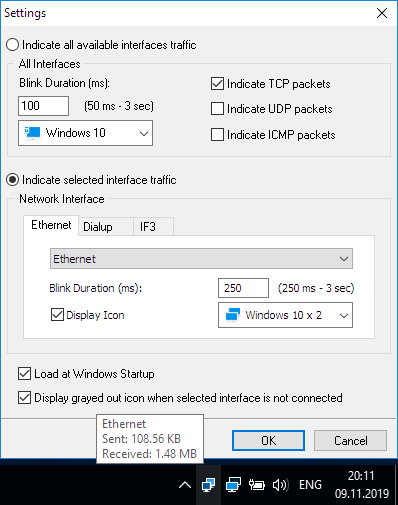
LanLights 1.1.21 freeware
BestFreewareDownload.com editor:
Network Activity Indicator for Windows 7
Author's description:
LanLight was written to replace the missing LAN activity lights for Windows 95/98 after upgrading to DSL or Cable with even more functionality.
| Author | Paul Mather |
| Released | 2011-11-14 |
| Filesize | 1.00 MB |
| Downloads | 10441 |
| OS | Windows 2000, Windows 2003, Windows XP, Windows Vista, Windows Vista x64, Windows 7, Windows 7 x64, Windows 8, Windows 8 x64, Windows 10, Windows 10 x64 |
| Installation | Instal And Uninstall |
| Keywords | LanLights, LAN, DSL, Cable, Lan Lights |
| Users' rating (84 rating) |
LanLights Free Download - we do not host any LanLights torrent files or links of LanLights on rapidshare.com, depositfiles.com, megaupload.com etc. All LanLights download links are direct LanLights download from publisher site or their selected mirrors.
LanLights 1.1.21   |
Didn't work properly. Upon uninstall it leaves the LanLights.exe in the Notification Area Icons window. Can't find to delete. |
LanLights 1.1.21 |
just what I wanted... my old XP data TX/RX icon back ..and a couple of extras to view at a touch of the mouse....thanks..Gene. |
LanLights 1.1.15 |
Oops sorry, please ignore my last message... I just realized that if you minimize the Lanlights after installing you get the classic two monitor icon in the notification area at bottom right of your screen. Works great! Thanks. :) |
LanLights 1.1.15 |
All I want is a simple two monitor icon for Win98SE like you see with XP. Could someone please make one???? I notice others are requesting this as well. |
LanLights 1.1.15 |
Nobody's mentioned if it works ok with Win98se. All I really want is a "Connected" Icon in the system tray. You mean to say NOBODY'S ever written one to "match" XP? If you can recommend something, please email me! Thanks |
| 1.1.21 | Nov 14, 2011 | New Release | Another fix for Windows 7 64 bit memory graphing |
| 1.1.15 | Aug 1, 2009 | New Release | * Changed several references to Long instead of Integer in hopes it will make the app work with 6+GB of memory installed |