SideSlide 5.85.0 freeware
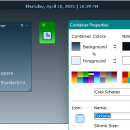
SideSlide by Northglide is a versatile desktop organizer that transforms your workspace into a highly customizable hub. With its unique sliding panels, users can easily access notes, shortcuts, and widgets without cluttering their desktop. The intuitive drag-and-drop interface allows for effortless organization, while the ability to create multiple slides caters to various tasks and projects. Ideal for multitaskers, SideSlide enhances productivity by keeping essential tools within reach, all whi ...
| Author | Northglide |
| Released | 2025-04-11 |
| Filesize | 860 kB |
| Downloads | 2474 |
| OS | Windows 11, Windows 10 32/64 bit, Windows 8 32/64 bit, Windows 7 32/64 bit, Windows XP |
| Installation | Instal And Uninstall |
| Keywords | SideSlide, desktop launcher, desktop bar, desktop note, launcher, launch, enhancer, shortcut |
| Users' rating (68 rating) |
SideSlide Free Download - we do not host any SideSlide torrent files or links of SideSlide on rapidshare.com, depositfiles.com, megaupload.com etc. All SideSlide download links are direct SideSlide download from publisher site or their selected mirrors.
| 5.85.0 | Apr 8, 2025 | New Release | Fixed issues that were introduced in the previous beta release: Fixed an issue where the workspace might briefly freeze after startup. Fixed an issue where the container note indicator button color wasn't correctly restored after deselection. Fixed an issue where selected shortcuts were executed when dragging a non-selected shortcut into an executable. This will now only occur if the dragged shortcut is also selected (Reminder: Drag shortcuts to activate with others by grabbing the shortcut's icon). Other changes and new features: Command-line Shortcuts: Added an option in the Shortcut Properties dialog to keep the command prompt window open after the command is executed. Additionally, the command input box is now larger, making it easier to enter multiple commands (separate commands with a double ampersand: &&). The /loadrss command-line option now populates RSS feeds only after the workspace has fully loaded, unlike before when it happened during the splash screen. The process can be aborted with the Esc key, and shortcuts remain functional while the feeds are loading. |
| 5.83 | Jun 6, 2024 | New Release | |
| 5.81 | Nov 11, 2023 | New Release |