XMPlay 4.0.0.1 freeware
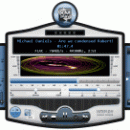
XMPlay, developed by UN4Seen, is a lightweight and versatile audio player that excels in delivering high-quality sound across various formats. With its user-friendly interface, it offers seamless navigation and customization options, allowing users to tailor their listening experience. XMPlay supports a plethora of audio formats, including MP3, FLAC, and MOD, making it a go-to choice for audiophiles. Its extensive plugin support enhances functionality, while its low resource usage ensures smooth ...
| Author | UN4Seen |
| Released | 2025-07-31 |
| Filesize | 317 kB |
| Downloads | 1822 |
| OS | Windows 11, Windows 10 32/64 bit, Windows 8 32/64 bit, Windows 7 32/64 bit, Windows Vista, Windows XP 32/64 bit |
| Installation | Instal And Uninstall |
| Keywords | XMPlay, Music Player, Audio Player, Music Library, Player, Playlist, Playback, Play |
| Users' rating (48 rating) |
|
| Our rating |

|
XMPlay Free Download - we do not host any XMPlay torrent files or links of XMPlay on rapidshare.com, depositfiles.com, megaupload.com etc. All XMPlay download links are direct XMPlay download from publisher site or their selected mirrors.
| 4.0.0.1 | Apr 28, 2025 | New Release | New default skin (old skin is downloadable) Skin hue and light adjustment Anto-mini mode can be enabled/disabled for all skins, with adjustable timeout WMA and AC3 support via Media Foundation (old WMA plugin is downloadable) Support for multiple tracks in MP4 files Support for 64-bit WAV and AIFF files GZIP archive support Support for #EXT-X-MEDIA tags in HLS master playlists Support for event message (emsg) metadata in fMP4 HLS streams Taskbar playback control buttons Adjustable seeking time step Old tracks can be faded-out over new tracks A gap can be inserted between tracks Crossfade/fade-out/gap track transitions can apply to subsongs too Option to disable preloading the next track when not crossfading Balance control added to DSP options The monitor can be kept awake during playback (for monitor speakers) Tracks can be sent to other apps/tools Filename and full path playlist column options Queue display option in extended playlist Shortcut/menu option to move selected tracks to the bottom of the playlist Shortcut/menu option to crop the playlist/library (remove unselected) Shortcut to play a random track from the library Track last play time is when playback ended (not started) Library average play count changed from per-month to per-year Abbreviated option for library "size" column Adjustable nested playlist reading limit File deletion can be disabled or require confirmation, optionally to the recycle bin Improved drag'n'drop support for moving tracks within XMPlay and to other apps Improved edge snapping for skins with padding Main and info windows can be snapped together Main window can be moved together with the info window Info window can be hidden when XMPlay is inactive Channel/bpm/speed info in MOD pattern display (replaces time display option) The documentation is now online, with context-sensitive help button in options window "Input plugins" options renamed "Decoders" and includes built-in decoders New "Version&quo |
| 4.0.0.8 | Mar 27, 2025 | New Release | New default skin (old skin is downloadable) Skin hue and light adjustment Anto-mini mode can be enabled/disabled for all skins, with adjustable timeout WMA and AC3 support via Media Foundation (old WMA plugin is downloadable) Support for multiple tracks in MP4 files Support for 64-bit WAV and AIFF files GZIP archive support Support for #EXT-X-MEDIA tags in HLS master playlists Support for event message (emsg) metadata in fMP4 HLS streams Taskbar playback control buttons Adjustable seeking time step Old tracks can be faded-out over new tracks A gap can be inserted between tracks Crossfade/fade-out/gap track transitions can apply to subsongs too Option to disable preloading the next track when not crossfading Balance control added to DSP options The monitor can be kept awake during playback (for monitor speakers) Tracks can be sent to other apps/tools Filename and full path playlist column options Queue display option in extended playlist Shortcut/menu option to move selected tracks to the bottom of the playlist Shortcut/menu option to crop the playlist/library (remove unselected) Shortcut to play a random track from the library Track last play time is when playback ended (not started) Library average play count changed from per-month to per-year Abbreviated option for library "size" column Adjustable nested playlist reading limit File deletion can be disabled or require confirmation, optionally to the recycle bin Improved drag'n'drop support for moving tracks within XMPlay and to other apps Improved edge snapping for skins with padding Main and info windows can be snapped together Main window can be moved together with the info window Info window can be hidden when XMPlay is inactive Channel/bpm/speed info in MOD pattern display (replaces time display option) The documentation is now online, with context-sensitive help button in options window "Input plugins" options renamed "Decoders" and includes built-in decoders New "Version&quo |
| 4.0.0.6 | Feb 28, 2025 | New Release | New default skin (old skin is downloadable) Skin hue and light adjustment Anto-mini mode can be enabled/disabled for all skins, with adjustable timeout WMA and AC3 support via Media Foundation (old WMA plugin is downloadable) Support for multiple tracks in MP4 files Support for 64-bit WAV and AIFF files GZIP archive support Support for #EXT-X-MEDIA tags in HLS master playlists Support for event message (emsg) metadata in fMP4 HLS streams Taskbar playback control buttons Adjustable seeking time step Old tracks can be faded-out over new tracks A gap can be inserted between tracks Crossfade/fade-out/gap track transitions can apply to subsongs too Option to disable preloading the next track when not crossfading Balance control added to DSP options The monitor can be kept awake during playback (for monitor speakers) Tracks can be sent to other apps/tools Filename and full path playlist column options Queue display option in extended playlist Shortcut/menu option to move selected tracks to the bottom of the playlist Shortcut/menu option to crop the playlist/library (remove unselected) Shortcut to play a random track from the library Track last play time is when playback ended (not started) Library average play count changed from per-month to per-year Abbreviated option for library "size" column Adjustable nested playlist reading limit File deletion can be disabled or require confirmation, optionally to the recycle bin Improved drag'n'drop support for moving tracks within XMPlay and to other apps Improved edge snapping for skins with padding Main and info windows can be snapped together Main window can be moved together with the info window Info window can be hidden when XMPlay is inactive Channel/bpm/speed info in MOD pattern display (replaces time display option) The documentation is now online, with context-sensitive help button in options window "Input plugins" options renamed "Decoders" and includes built-in decoders New "Version&quo |