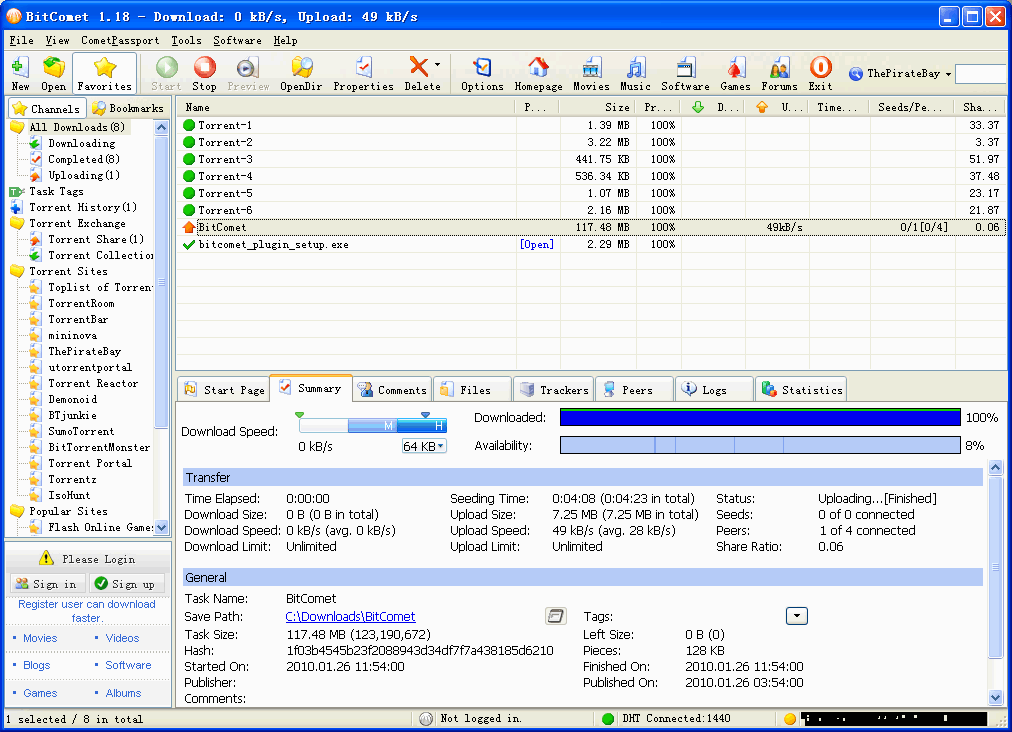
BitComet 2.15 freeware
BitComet is a versatile and user-friendly BitTorrent client that excels in downloading large files efficiently. With its intuitive interface, users can easily manage torrents, schedule downloads, and prioritize files. BitComet supports multiple protocols, including HTTP and FTP, ensuring a seamless experience. Its built-in media player allows for instant playback of videos while downloading. Additionally, advanced features like bandwidth management and a powerful search tool make it a top choice ...
| Author | BitComet |
| Released | 2025-06-17 |
| Filesize | 35.60 MB |
| Downloads | 35811 |
| OS | Windows 11, Windows 10 32/64 bit, Windows 2003, Windows 8 32/64 bit, Windows 7 32/64 bit, Windows Vista, Windows XP 32/64 bit, Windows 2K |
| Installation | Instal And Uninstall |
| Keywords | BitComet, BitComet free download, bittorrent client, share file, peer2peer client, peer2peer, p2p, torrent, share |
| Users' rating (208 rating) |
BitComet Free Download - we do not host any BitComet torrent files or links of BitComet on rapidshare.com, depositfiles.com, megaupload.com etc. All BitComet download links are direct BitComet download from publisher site or their selected mirrors.
| 2.15 | Jun 17, 2025 | New Release | GUI Improved: Automatically detect IP information when the mobile app binding window is displayed GUI Improved: The mobile app QR code binding window allows you to manually specify a domain name as the connection address GUI Improved: The availability of the pieces in the BT task summary panel has changed to task health GUI Improved: The piece map shows the piece number where the mouse hovers GUI Improved: The peer list shows whether the connecting peers are in pending status GUI Improved: The dialog for batch downloading magnetic links and RSS has added an option: whether to allow automatic renaming GUI Improved: The flow graph on the Linux/macOS editions shows the memory usage GUI Bugfix: In the HTTP task properties window, when querying the size of the bc link file, no cookie and user_agent information was sent GUI Bugfix: Fix the title of add task page in remote access GUI Bugfix: The default size of the search box in the advanced settings of option window has issues in the Linux edition GUI Bugfix: The SpinButton displays abnormally WebUI:Task page in the options window WebUI:Directory page in the options window WebUI:You can customize the save path when adding a task WebUI:Add right-click menu to the bottom status bar WebUI:Show notification list window WebUI:Add task tag filter to the left sidebar WebUI:Add copy command to the right-click menu of each list WebUI:The right-click menu of the task list adds commands such as start, stop, delete, clean, and copy information WebUI:Add a right-click menu to the headers of the task list and peer list to select the columns to display WebUI:The task list adds sharing rate and health columns, and the peer list adds a status column, which is not displayed by default WebUI:The availability of the pieces in the BT task summary panel has changed to task health Core Improved: Uses the jemalloc memory allocator in the Linux edition Core Bugfix: The seed file creation has an error in handling multi-level directories in the Lin |
| 2.14 | May 16, 2025 | New Release | GUI Improved: A prompt is added to the proxy server option to indicate that only IP addresses are supported, not domain names GUI Improved: A prompt message is added to the listening port on the remote access settings page WebUI:Implement task piece graphs WebUI:Implement flow graph WebUI:The bottom bar displays status information WebUI:Added CometID sign in dialog WebUI:Added mobile APP binding function WebUI:The console mode program does not allow disabling the WebUI WebUI:Fixed the issue of menu operation on touchscreen devices WebUI:Fixed task switch refresh when auto-refresh was disabled WebUI:Avoid legacy remote access page requests for favicon.ico Core Improved: Win32 editions supports file names including emoji characters Core Bugfix: The algorithm for blocking peers who transmit erroneous data multiple times has failed Core Bugfix: When moving BT task files to other directories on the same drive, the files of non-BT tasks in the folder will be moved together, regardless of whether selecting Move all files in the subfolder of the task Core Bugfix: The task list is sorted incorrectly by task size, and the BT task size should exclude the size of the padded area of the file boundary |
| 2.12 | Jan 14, 2025 | New Release | GUI Improved: add manual IP list in the IP filter page of Option dialog GUI Improved: new commands in context menu of peer list: ban IP permanently, unban all peers in task, unban all peers in all tasks GUI Improved: new option in Proxy settings page: use proxy to query long-term seeds GUI Improved: the default value of network.ignore_remote_access_in_speed_limit changed to true WebUI: adding IP list function changed to manual IP list in the IP filter page of Option dialog WebUI: add IP filter and max display count option in the context menu of peer list WebUI: add refresh interval option in View menu WebUI: add connection failed banner and retry button WebUI: peer list can choose group to display WebUI: peer list can unban specific IP in all tasks WebUI: peer list fix multiple-selection issue with shift key Core Improved: the file I/O module supports accessing the contentUri path in the Android system Core Bugfix: after enabling HTTPS mode for remote access, the Android app cannot connect to the desktop edition Core Bugfix: for BT tasks that are not piece aligned, when switching file priorities, the data of first and last piece may not be written correctly to the disk Core Bugfix: network.ignore_remote_access_in_speed_limit not applied to global download rate limiter Core Bugfix: the clients should re-login after changing username and password of Web UI Core Bugfix: no error message displayed when failed to listen on TCP port Core Bugfix: the manual IP list for IP filter is not loaded when the imported IP list is empty |